Sunday, March 30, 2014

Applications through C++


Hello C++ lovers, today am going to make you all familiar with some useful trade offs / applications of C++. These applications are


You can simply implement all these functionalities through these methods:


Concurrent Waiting

Concurrent waiting can be drawn on the basis of these three mechanisms

Concurrent Waiting | .get

size_t
file_sizes( string file1, string file2 )
   {

   task<file> f1 = open(file1),
              f2 = open(file2);
   return f1.get().size() +
          f2.get().size();

}

Concurrent Waiting | .then

task<size_t>
file_sizes( string file1, string file2 )

    {
   task<file> f1 = open(file1),
              f2 = open(file2);
   return when_all(f1,f2)
      .then([=](tuple<file,file> fs)
       {
         return get<1>(fs).size() +
                get<2>(fs).size();

      });
}

Concurrent Waiting | .then + await

task<size_t>
file_sizes( string file1, string file2 ) __async
    {

   task<file> f1 = open(file1),
              f2 = open(file2);
   return (__await f1).size() +
          (__await f2).size();

}

Real Payoffs | Branches & Loops

Branches & Loops | .get

string
read( string file, string suffix )
   {

   istream fi = open(file).get();
   string ret, chunk;
   while( (chunk = fi.read().get()).size() )
      ret += chunk + suffix;
   return ret;

}

Branches & Loops | .then

task<string>
read( string file, string suffix )
  {

   return open(file)
   .then([=](istream fi)
     {
      auto ret = make_shared<string>();
      auto next =
         make_shared<function<task<string>()>>(
      [=]
     {
         fi.read()
         .then([=](string chunk)
                {
            if( chunk.size() )
                 {
               *ret += chunk + suffix;
               return (*next)();
            }
            return *ret;
         });
      });
      return (*next)();
   });

}

Branches & Loops | .then + await

task<string>
read( string file, string suffix ) __async
{

   istream fi = __await open(file);
   string ret, chunk;
   while( (chunk = __await fi.read()).size() )
      ret += chunk + suffix;
   return ret;

}

Basic of Angular JavScript

Why ‘Angular JavaScript’ …?


As we know that HTML is great for declaring STATIC DOCUMENTSbut it get fails when we try to use it for declaring DYNAMIC VIEWS in Web-applications. Angular JavaScript allows you to extend HTML tags, features and vocabulary for your applications (doesn’t matter native, web, static or dynamic), websites and portals.
The resulting environment that we get after using Angular JavaScript makes our project work-


- Extraordinarily Expressive
- Readable
- Flexible
- Quick to develop
- More Dynamic
- Extensibility
- Rich Vocabulary

Alternatives:

There is no best alternative of JavaScript but other frameworks deal with HTML’s shortcomings by either subtracting away features of HTML, CSS 
and/or JavaScript or by providing an imperative way for manipulating the Deterministic Object Model [DOM]
Neither of these is that much useful to fulfill the Dynamic views for HTML.

Extensibility:

In simple words we can define Angular JavaScript as ‘TOOLSET’ or‘TAG KIT’ that provides supports for building the dynamic framework that most suited to your application(native, web, static or dynamic), website or portal development. It is fully extensible, flexible and can work well with other libraries easily.
Every feature can be modified or replaced to suit your unique development workflow and features needs.

Simple Example:

There are 3 major parts in this example just similar like any other HTML coding, these parts consists:


[PROCEDURE]

JS code depends on you (for providing more extensibility in your code).


STEP1:  HTML CODE

<div ng-app>
<div>
<label> Name: </label>
<input type=”text” ng-model=”ABC” placeholder=”Write anything”>
<hr>
<h1> Hello its Abhishek Jaiswal {{ABC}}… </h1>
<div>
<div>


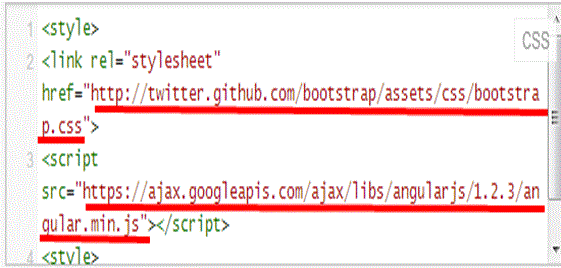
STEP2:  CSS Code

<style>
<link rel=”stylesheet” href=”http://twitter.github.com/bootstrap/assets/css/bookstrap.css”>
<script src=
https://ajax.googleeapis.com/ajax/libs/angularjs/1.2.3/angular.min.js>
</script>
</style>


STEP3:  JS Code

JS code depends on you (for providing more extensibility in your code).
<!—its on you-->


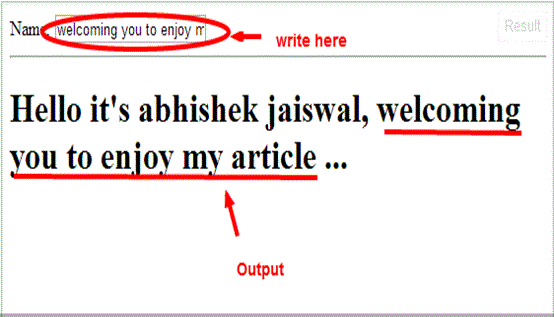
OUTPUT:


Whatever you will write in that box, will directly appear after Hello it’s Abhishek Jaiswal <!—content will be hereà